Convert an Excel Spreadsheet to JSON using SheetJS and Vanilla JavaScript
Spreadsheets are still one of the most common ways to store and share data. But when you’re working on a website or web app, JSON is usually the format you actually want.
With SheetJS, you can convert Excel or CSV files directly into JSON using vanilla JavaScript, right in the browser — no frameworks, no backend required.
Why Use SheetJS with Vanilla JavaScript?
Using SheetJS with plain JavaScript lets you:
- Convert Excel or CSV files directly in the browser
- Avoid server-side processing and keep everything client-side
- Build simple websites, admin tools or internal dashboards
What Is SheetJS?
SheetJS is a JavaScript library for reading and writing spreadsheet files such as:
- .xlsx
- .xls
- .csv
It works in both browsers and Node.js but in this article, we’ll focus on browser usage with vanilla JS.
Include SheetJS in Your HTML
<script type="text/javascript" src="https://cdn.sheetjs.com/xlsx-0.20.3/package/dist/xlsx.full.min.js"></script>
Read the File with JavaScript
  <script>
    let url = "/assets/images/posts/2026/2026-02-09/irish-hosting-companies.xlsx";
    console.log("fetching data from excel file...");
    let events;

    async function fetchData() {
      try {
        const response = await fetch(url);
        if (!response.ok) {
          throw new Error("Fetch failed");
        }

        const arrayBuffer = await response.arrayBuffer();
        const data = new Uint8Array(arrayBuffer);

        const workbook = XLSX.read(data, {
          type: "array"
        });
        const first_sheet_name = workbook.SheetNames[0];
        const worksheet = workbook.Sheets[first_sheet_name];

        events = XLSX.utils.sheet_to_json(worksheet);
        console.log("Data fetched and converted to JSON");
      } catch (error) {
        console.error(error);
        throw error;
      }
    }
    document.addEventListener("DOMContentLoaded", fetchData);
  </script>
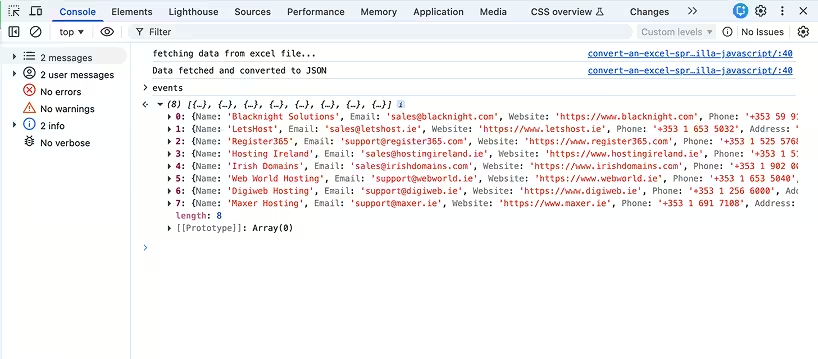
Running this code will fetch the Excel file, read its contents and convert the first sheet into a JSON array of objects. Each object represents a row, with keys corresponding to the column headers.
You can then use this JSON data stored in the events variable for whatever you need in your web app.
Things to Keep in Mind
- Large files may affect browser performance
- Column headers should be clean and consistent
- Dates and numbers may need formatting depending on your use case
Final Thoughts
Using SheetJS with vanilla JavaScript is one of the easiest ways to turn spreadsheet files into JSON directly in the browser. It’s lightweight, fast, and doesn’t require any frameworks or backend code.
If you need a simple, reliable way to process Excel or CSV files on the web, this approach is hard to beat.
Demo
Download the example spreadsheet
Got a specific project in mind? Feel free to contact me. I’m always happy to chat about how I can help you with your next web project.